
.png)

Description
Download Sunsama Calendar – Free Team Scheduling & Collaboration Tool
Overview
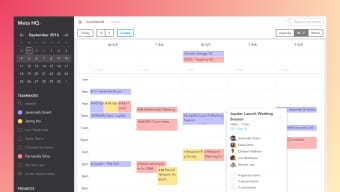
Sunsama Calendar is a free, cloud‑based scheduling app designed specifically for modern work teams that need to stay coordinated across time zones, projects, and daily tasks. Unlike generic calendar tools, Sunsama blends a clean, drag‑and‑drop interface with real‑time collaboration features, allowing every team member to see who is working on what at a glance. The app shines in remote‑first environments, where visibility and quick communication are essential. Users can create shared calendars for each project, attach notes, set priorities, and even tag colleagues for instant feedback. Because Sunsama is built on a web‑first architecture, it syncs automatically across devices, ensuring that updates made on a laptop appear instantly on a mobile phone or tablet. The platform also integrates with popular productivity suites such as Google Workspace, Microsoft 365, and Slack, turning a simple calendar into a hub for project planning, daily stand‑ups, and milestone tracking. While there are many alternatives on the market, Sunsama’s smart interface, zero‑cost entry point, and focus on collaborative workflow make it a compelling option for startups, freelancers, and larger enterprises alike. Whether you’re coordinating a two‑person design sprint or a multinational product launch, Sunsama Calendar gives you the clarity and control you need without the overhead of complex project‑management software.
Key Features
- Shared Project Calendars: Create unlimited calendars that are instantly visible to all invited teammates.
- Real‑time Editing: Drag, drop, and resize tasks on the fly; changes propagate instantly to every user.
- Inline Notes & Suggestions: Add context, attach files, or leave quick comments directly on calendar entries.
- Multi‑platform Sync: Seamless synchronization across Windows, macOS, Android, and iOS devices.
- Integration Ecosystem: Connect with Google Calendar, Outlook, Slack, Trello, and Asana for unified workflow.
- Time‑zone Awareness: Automatic conversion of meeting times, ideal for distributed teams.
- Custom Views: Switch between daily, weekly, and monthly layouts, or use the “Focus Mode” to see only your own tasks.
- Security & Privacy: End‑to‑end encryption, GDPR compliance, and role‑based access controls.
- Free Forever Plan: Unlimited users, unlimited calendars, and core features at no cost.
- Upcoming Updates: Roadmap includes AI‑driven scheduling suggestions and advanced reporting dashboards.
Installation, Compatibility & Usage
Getting started with Sunsama Calendar is intentionally straightforward. The app is available as a web app (https://sunsama.com) and as native clients for Windows, macOS, Android, and iOS. Follow these steps to install and begin using the platform:
- Sign up: Visit the official website and create a free account using an email address or single sign‑on with Google or Microsoft.
- Download the client (optional): For desktop users, click the “Download for Windows” or “Download for macOS” button. Mobile users can find “Sunsama Calendar” in the Apple App Store or Google Play Store.
- Verify your email: A verification link will be sent; confirm to unlock full functionality.
- Create your first calendar: Click “New Calendar,” give it a name (e.g., “Product Launch Q4”), and invite team members by entering their email addresses.
- Set up integrations: Navigate to Settings → Integrations and connect your Google, Outlook, or Slack accounts. This step ensures that events created in Sunsama appear in your existing calendars and vice‑versa.
- Start scheduling: Drag tasks onto the timeline, assign owners, set due dates, and add notes. Use the “@” mention feature to alert colleagues instantly.
- Utilize views: Switch between “Day,” “Week,” and “Month” to get the perspective you need. The “Focus Mode” hides all but your personal tasks, helping you stay on track.
Sunsama Calendar runs on Windows 10 or later, macOS 10.14 or later, Android 8.0 or later, and iOS 13 or later. Because the core product is web‑based, any modern browser (Chrome, Edge, Firefox, Safari) can access all features without installation.
Pros, Cons, FAQ & Conclusion
Pros
- Free core plan with unlimited users.
- Intuitive drag‑and‑drop interface that requires no training.
- Robust real‑time collaboration and commenting.
- Native apps for all major operating systems.
- Deep integrations with the most popular productivity suites.
- Strong security posture (encryption, GDPR compliance).
Cons
- Advanced reporting and AI scheduling are locked behind a paid tier.
- No built‑in video conferencing; relies on external tools.
- Limited offline functionality for the web version.
- Custom branding options are only available to enterprise plans.
Frequently Asked Questions
Is Sunsama Calendar really free?
Yes. The free tier includes unlimited users, unlimited calendars, and all core scheduling features. Premium upgrades add AI suggestions, advanced analytics, and priority support.
Can I sync Sunsama with my existing Google Calendar?
Absolutely. In Settings → Integrations you can connect Google Calendar (as well as Outlook, Apple Calendar, and others). Events created in either system stay in sync automatically.
How does Sunsama handle time‑zone differences?
Each user sets a preferred time zone in their profile. The calendar displays all events in the viewer’s local time, while storing a single canonical time internally. This eliminates confusion for distributed teams.
Is there a mobile app, and does it support offline work?
Sunsama offers native Android and iOS apps. The apps cache recent data for quick viewing, but full editing requires an internet connection. Offline support is on the product roadmap.
What security measures protect my data?
Data is encrypted in transit (TLS 1.3) and at rest (AES‑256). Sunsama complies with GDPR, SOC 2, and offers role‑based access controls to limit who can view or edit calendars.
Conclusion & Call to Action
For teams that need a lightweight, collaborative scheduling solution without the price tag, Sunsama Calendar delivers exactly that. Its real‑time editing, seamless integrations, and free forever model make it a standout choice for startups, remote agencies, and even larger enterprises looking to simplify day‑to‑day coordination. While power users may eventually upgrade for AI‑driven suggestions and advanced reporting, the core experience is more than sufficient for most day‑to‑day project work.
Ready to bring clarity to your team's workload? Download Sunsama Calendar now and start organizing your projects for free. Experience a smarter way to plan, collaborate, and stay on track—without the hassle of complex software.
Sunsama Calendar strikes an excellent balance between simplicity and functionality. The free tier is generous, the UI feels modern, and the real‑time collaboration features reduce the friction of remote teamwork. Minor drawbacks like limited offline editing and the absence of native video calls are outweighed by the overall value. Recommended for any team that wants a clear, shared view of work without paying for a full‑blown project‑management suite.
Guides & Tutorials for Sunsama Calendar
How to install Sunsama Calendar
- Click the Preview / Download button above.
- Once redirected, accept the terms and click Install.
- Wait for the Sunsama Calendar download to finish on your device.
How to use Sunsama Calendar
This software is primarily used for its core features described above. Open the app after installation to explore its capabilities.
User Reviews for Sunsama Calendar 0
No reviews found




